


 English
  Español
  Français
PCB Design, Layout, Schematics & Troubleshooting: The Complete Guide
Content
- 1 PCB Design and Layout: Core Principles Before You Route a Single Trace
- 2 PCB Board Design Software: Choosing the Right Tool
- 3 Schematic Diagram of PCB: From Circuit Concept to Layout-Ready Netlist
- 4 PCB Via in Pad: When to Use It and How to Do It Right
- 5 PCB Thermal Hotspot Map: Identifying and Fixing Heat Concentration
- 6 How to Troubleshoot a PCB: A Systematic Debug Approach
PCB Design and Layout: Core Principles Before You Route a Single Trace
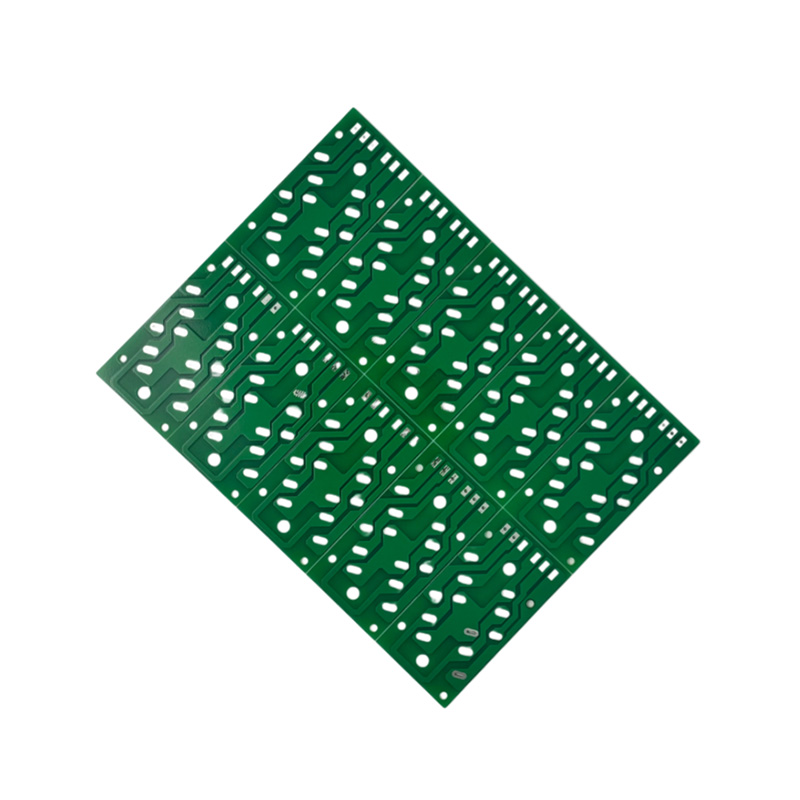
PCB design and layout is the process of translating an electrical schematic into a physical board — placing components, routing copper traces, defining layer stackups, and preparing manufacturing files. The quality of this translation determines whether a board works on the first build or spends weeks in debug cycles. Poor layout decisions — inadequate clearances, wrong trace impedances, uncontrolled return paths — cause failures that no amount of component selection can fix.
A structured layout sequence prevents most of these issues. The standard workflow is: define board outline and layer stackup → place high-speed and power components first → route critical nets (clock, differential pairs, power planes) → route secondary signal traces → run design rule checks (DRC) → generate Gerber and drill files. Jumping straight to routing without finishing placement is the single most common cause of rework.
Layer Stackup and Impedance Control
For any board carrying signals above 100 MHz, controlled impedance traces are non-negotiable. A standard 4-layer stackup — signal / ground / power / signal — provides a solid reference plane beneath all routing layers, keeping trace impedance predictable. Target 50Ω for single-ended traces and 100Ω differential for most digital interfaces (USB, HDMI, PCIe). Trace width for a 50Ω microstrip on FR-4 with a 0.2 mm dielectric is approximately 0.38 mm — but always confirm with your fabricator's stack data, since dielectric thickness and Dk (dielectric constant) vary between suppliers.
Component Placement Rules
Placement drives routing efficiency and signal integrity. Key rules that reduce layout iterations:
- Place decoupling capacitors within 0.5 mm of IC power pins, on the same layer, with the via connecting to the power plane after the capacitor — not between the IC pin and cap.
- Cluster components by functional block: keep the MCU, its crystal, and decoupling caps together; separate analog and digital sections with a physical gap or split plane boundary.
- Orient ICs so that their high-speed signal ports face the nets they connect to, minimizing trace length and avoiding crossing return paths.
- Keep high-current traces (motor drivers, power converters) away from sensitive analog inputs; crosstalk from a switching power rail can corrupt ADC readings at distances up to 5 mm on the same layer.
PCB Board Design Software: Choosing the Right Tool
The right PCB board design software depends on team size, board complexity, and budget. All modern EDA tools share a common workflow — schematic capture → netlist → PCB layout → DRC → fabrication output — but they differ substantially in routing capability, library quality, collaboration features, and simulation integration.
| Software | Target User | Max Layers | Simulation | Cost |
|---|---|---|---|---|
| Altium Designer | Professional teams | 32+ | SI, PI, thermal | $$$$ |
| KiCad | Makers, startups | 32 | Basic SPICE | Free |
| Eagle (Fusion 360) | Hobbyists, small teams | 16 | Limited | Free–$$ |
| OrCAD / Cadence | Enterprise / aerospace | 40+ | Full SI/PI suite | $$$$ |
| EasyEDA / LCEDA | Prototype, cloud-first | 16 | None | Free–$ |
For professional hardware teams, Altium Designer remains the industry benchmark for high-density, high-speed board design — its interactive router, differential pair management, and native 3D MCAD integration justify the cost for complex projects. KiCad 7 has closed the gap significantly for 4–8 layer boards and is now the default for open-source hardware. Teams prioritizing cloud collaboration and direct fab integration increasingly use EasyEDA paired with JLCPCB for rapid prototyping cycles under 72 hours.
Schematic Diagram of PCB: From Circuit Concept to Layout-Ready Netlist
A schematic diagram for PCB is the logical representation of an electronic circuit — it defines every component, every electrical connection, and every reference designator, but contains no physical placement information. The schematic is the contract between the circuit designer and the layout engineer: every net on the schematic must be correctly realized in copper on the board, with no unintended connections and no missing ones.
A PCB board circuit diagram follows standard conventions that make it readable across teams and software platforms:
- Power rails run horizontally at the top of the sheet; ground symbols connect at the bottom. Positive voltage rails (VCC, VBUS, VBAT) use distinct net labels, never shared by coincidence.
- Signal flow moves left to right — inputs enter from the left, outputs exit to the right. This convention makes the schematic readable without an explanation.
- Net labels replace long wire runs on multi-page schematics. Every net label must be unique and consistent — a mismatch between pages creates a phantom open circuit that DRC will not catch.
- Decoupling capacitors are placed next to the IC they decouple on the schematic, using a separate power symbol — this helps the layout engineer understand which cap belongs to which pin.
- Reference designators follow standard prefixes: R (resistor), C (capacitor), U (IC), J (connector), L (inductor), Q (transistor), D (diode).
Electrical rules checks (ERC) in the schematic tool catch most wiring errors before the design reaches layout — unconnected pins, pins driven by multiple sources, power conflicts. Running ERC to zero errors before exporting the netlist is mandatory; layout cannot fix a schematic error.
PCB Via in Pad: When to Use It and How to Do It Right
A PCB via in pad places a through-hole or blind via directly within a component's SMD land pad, rather than routing a short trace from the pad to a nearby via. This technique is primarily used with fine-pitch BGAs (ball grid array packages), QFNs, and other components where the pitch between pads is too tight to route an escape trace alongside the pad.
Why Via in Pad Improves High-Speed Performance
Routing a short dog-leg trace from a BGA pad to a via introduces inductance and can create a stub that reflects high-frequency signals. Via in pad eliminates this trace entirely, reducing parasitic inductance by 30–50% compared to a 0.5 mm dog-leg escape trace. For DDR5, PCIe Gen 4/5, and 10GbE interfaces running above 8 GT/s, this difference is measurable in eye diagram margin.
Via in pad also enables tighter BGA escape routing — a 0.65 mm pitch BGA has only ~0.25 mm between pad edges, which cannot accommodate a standard via beside the pad without violating minimum annular ring and clearance rules. Via in pad is the only viable escape strategy for sub-0.5 mm pitch packages.
Manufacturing Requirements
Via in pad requires specific fabrication treatment that adds cost. The via barrel must be filled with conductive or non-conductive epoxy and capped (plated over) before solder mask application. Without filling, solder wicks down the via barrel during reflow, starving the joint and causing intermittent contact or outgassing voids. Specify "via fill + cap plate" explicitly in your fab notes — it is not a default process. Expect a 15–25% fabrication cost premium for via-in-pad boards versus standard vias.
- Conductive fill is preferred for power and ground vias — it improves thermal and current-carrying performance through the via.
- Non-conductive fill is acceptable for signal vias and is typically lower cost.
- Minimum finished hole size for via in pad is typically 0.1 mm (laser-drilled microvias) to 0.2 mm (mechanical drill), depending on the board thickness and aspect ratio constraints.
PCB Thermal Hotspot Map: Identifying and Fixing Heat Concentration
A PCB thermal hotspot map is a visual heat distribution analysis — generated either through simulation before fabrication or through infrared (IR) camera measurement on a live board — that shows which areas of the PCB exceed safe operating temperatures. Hotspots cause accelerated component aging, solder joint fatigue, and outright thermal shutdown in power management ICs, MOSFETs, and linear regulators.
Simulation-Based Thermal Analysis
Modern PCB design software with thermal simulation (Ansys Icepak, Cadence Celsius, Altium's integrated thermal solver) generates hotspot maps by applying power dissipation values to each component and solving the heat conduction equation across the board. Inputs required include component theta-JB (junction-to-board thermal resistance), copper pour coverage, via density, and ambient temperature plus airflow conditions. Boards with power densities above 5 W/cm² almost always require simulation before first build — reworking thermal issues post-fabrication is expensive and sometimes impossible without a board respin.
IR Camera Measurement on Live Boards
For built boards, a FLIR or similar mid-wave IR camera at 320×240 resolution or better can resolve hotspots down to individual QFN pads when operated at the correct working distance. Run the board at full rated load for at least 10 minutes before capturing thermal images — surface temperatures take several minutes to reach steady state, and early readings underestimate peak junction temperatures. Any surface temperature above 85°C under standard ambient conditions warrants investigation; many consumer-grade components are rated to 85°C case temperature, meaning internal junction temperature is already near or above the limit.
Layout Solutions for Thermal Hotspots
Once hotspots are identified, layout-level corrections are the most effective fix:
- Thermal vias — Arrays of filled vias under the exposed pad of power ICs conduct heat to internal copper planes. A standard 3×3 via array under a QFN's thermal pad reduces theta-JB by 20–40% versus no vias.
- Copper pour expansion — Increasing the copper pour area around a hot component by 2× typically reduces surface temperature by 5–15°C, depending on the board's copper coverage and airflow.
- Component spreading — Moving heat-generating components apart prevents thermal coupling; two dissipating devices within 3 mm interact thermally and raise each other's steady-state temperature.
- Heatsink attachment areas — For components exceeding 2W continuous dissipation, specify a board area clear of solder mask and components adjacent to the package to allow clip-on or adhesive heatsinks.
How to Troubleshoot a PCB: A Systematic Debug Approach
Knowing how to troubleshoot a PCB efficiently separates engineers who close debug loops in hours from those who spend days swapping components at random. The key is following a structured isolation method rather than guessing — most PCB faults are localized to a single functional block, and systematic measurement narrows the fault domain quickly.
Step 1: Visual Inspection Before Powering Up
Before applying power to a new or suspect board, inspect visually and with a multimeter. Check for solder bridges on fine-pitch ICs (a 10× loupe or digital microscope at 40× reveals bridges invisible to the naked eye), verify polarity-sensitive components (electrolytic caps, diodes, ICs with asymmetric pinouts), and measure resistance between power and ground rails. A resistance below 10Ω across the main supply rail before power-up indicates a short — applying voltage to a shorted board risks burning traces and destroying components.
Step 2: Power Rail Verification
Bring up power rails in sequence, starting with the main input and working through each regulator output. Verify voltage at the regulator output pin, then at the IC power pins — a voltage drop between these two points indicates trace resistance or a via with poor plating. Check ripple on each rail with an oscilloscope (AC coupling, 20 MHz bandwidth limit); ripple exceeding 50 mV peak-to-peak on a digital supply can cause logic errors that mimic firmware bugs.
Step 3: Functional Block Isolation
Divide the board into functional blocks — power, MCU, communications, peripherals — and test each in isolation where possible. For an MCU that fails to boot, first confirm the crystal oscillator is running (measure at the XTAL pin with a scope; a flat signal means no oscillation), then check the reset pin is releasing properly, then verify the SWD/JTAG debug interface. A logic analyzer on the bus helps distinguish between firmware issues and hardware failures — if valid SPI clock and MOSI signals are present but MISO is silent, the fault is downstream of the MCU.
Step 4: Common PCB Fault Signatures
- Intermittent resets under load — Power supply undervoltage during current transients; check bulk capacitance near the MCU power pin and verify power rail does not droop below the IC's minimum operating voltage during GPIO switching events.
- Excess current draw with no output — Latch-up in a CMOS IC (caused by ESD or power sequencing violations) or a shorted bypass capacitor; isolate by removing ICs from the supply rail one by one.
- Communication errors on high-speed interfaces — Impedance mismatch, stub reflections, or missing termination; verify with a TDR (time domain reflectometer) or infer from eye diagram measurements on an oscilloscope.
- Functional failure only at temperature — Component outside specified temperature range, or a via crack that opens under thermal expansion; place the board in a thermal chamber and monitor for the fault threshold.
- ADC readings offset or noisy — Ground plane split or digital switching noise coupling into the analog reference; verify AGND and DGND are connected at a single star point and the analog section is isolated from switching regulators.
Recommended Products

 LET'S CREATE THE FUTURE TOGETHER

Contact Us Anytime
Copyright © Anhui Hongxin Electronic Technology Co., Ltd. All Rights
Reserved.
privacy
Wholesale Printed Circuit Board Suppliers, Manufacturers

